
We’re closing October with four more updates, following our early October release. They make it easier to authenticate in Projects, discover more of single-page applications, and see what to do next as you set up and use the platform.
Here’s what’s new:
- Login Steps: Describe a login flow in plain language and let Equixly follow it to authenticate in Projects, as it already does in Discovery.
- SPA discovery: Reach more endpoints on single-page applications through an improved engine approach.
- Guided empty states and project creation: See the next step in every view that can be empty and set up Projects through an improved wizard.
- Sidebar shortcuts: Create Services and Projects or launch Discoveries and Exploitation Scans directly from the sidebar.
Login Steps: Authentication in plain language
Login Steps is the most significant change in this release. It adds a new authentication method to project settings: you describe how your login works in plain language, and Equixly follows those steps to authenticate. No long manual forms to fill in.
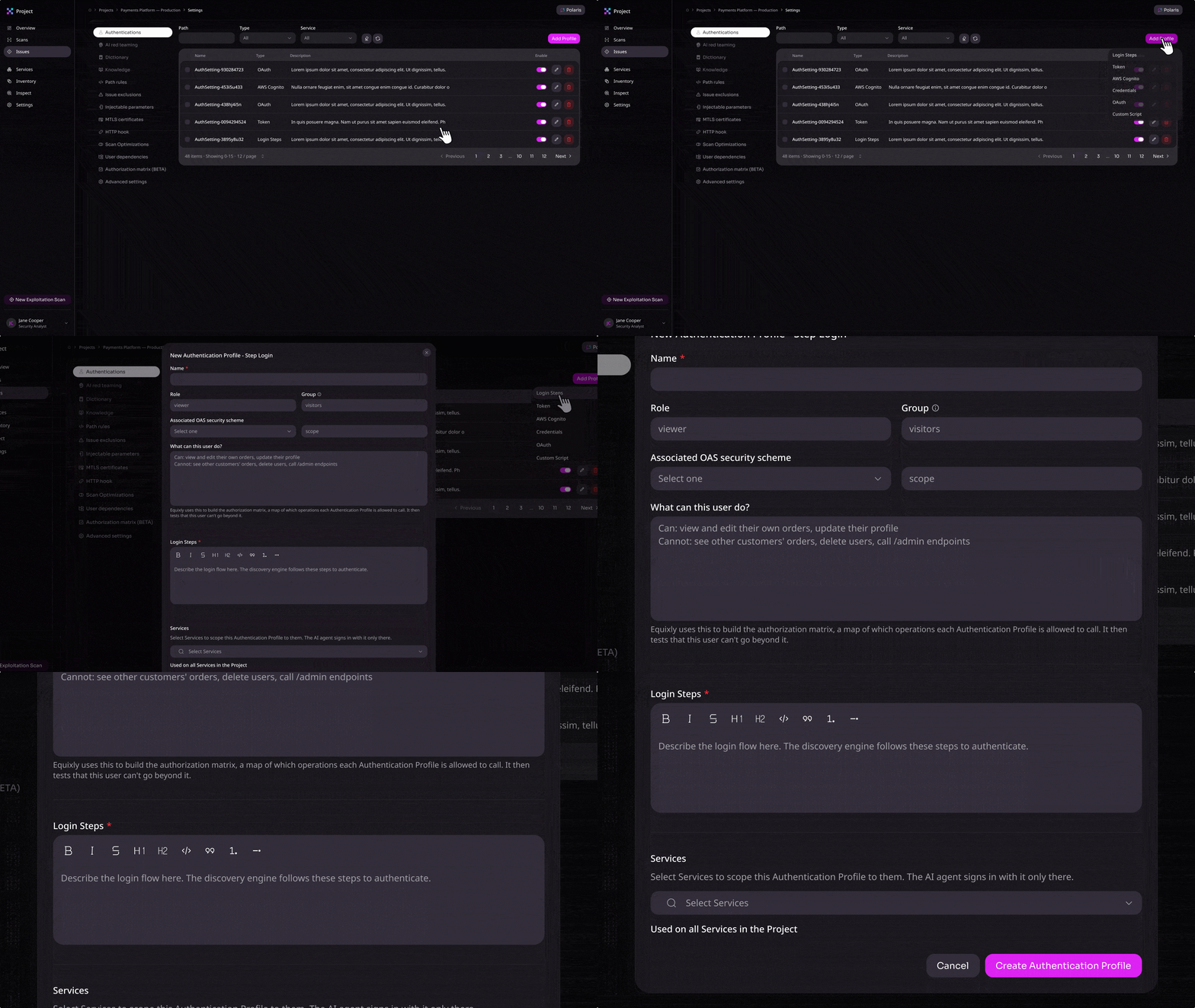
As with other authentication profiles, you can also associate an OAS security scheme and describe what a user role can and cannot do, which Equixly uses to build the authorization matrix and then test that users can’t go beyond it.
Discovery already authenticates this way, through the natural-language authentication option introduced in June, which we’re also renaming Login Steps for consistency across the platform. With this release, Projects do too, so the same plain-language approach now covers both mapping your attack surface and testing it.
SPA discovery: Better coverage of single-page applications
Discovery has supported single-page applications (SPAs) for some time. With this release, an improved approach developed by our engineering team handles more of their client-side behavior, closing the coverage gap with server-rendered targets.
Why does that gap exist in the first place? In a server-rendered application, each page is a separate document, and links lead to URLs a crawler can request directly.
An SPA works differently. It loads once, builds its views in the browser, switches routes without reloading the page, and calls its APIs in the background as the user interacts with it. So parts of what an SPA exposes appear only after the right sequence of interactions.
The improved engine handles this behavior. It
- Follows client-side routing and application state, reaching views that never correspond to a separate request for a new page.
- Intercepts XHR and fetch requests, capturing the API calls the frontend makes in the background.
- Works through infinite scroll, lazy loading, and shadow DOM, surfacing content and components that load only on demand or sit outside the regular document structure.
Endpoint coverage on SPA targets is higher as a result. And because Discovery builds the Services you later pentest, the better coverage gives your penetration tests more to work with.
Guided empty states and project creation: Next steps and a project wizard
This release changes what you see in empty views and when you create a Project.
Guided empty states
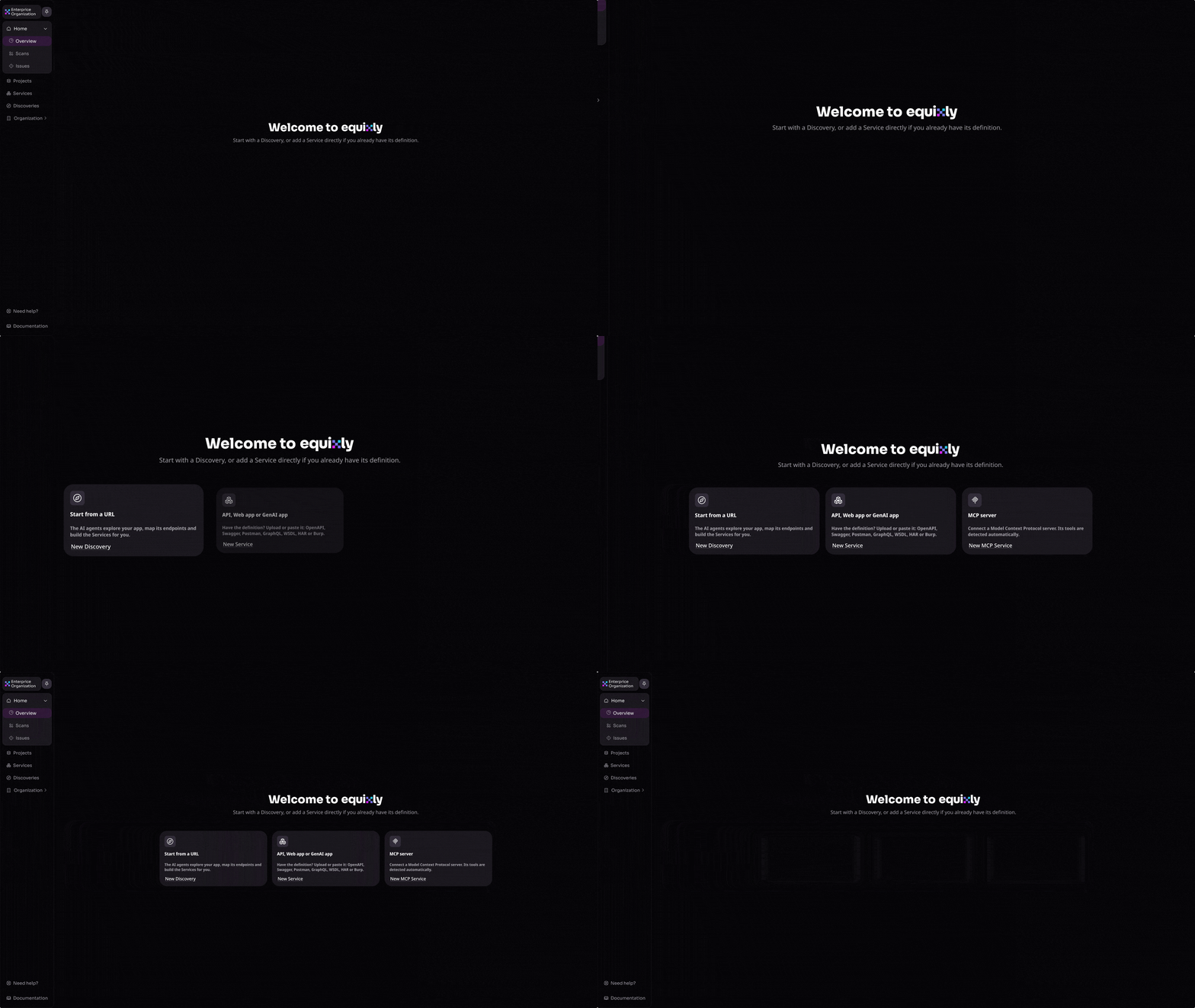
Home, Projects, Services, and every other view that can be empty now explain the next step and offer a direct call to action.
On Home, for example, a new user can see three ways to start:
- Start from a URL: Launch a Discovery and let the AI agents explore your application, map its endpoints, and build the Services for you.
- API, Web app or GenAI app: Create a Service from a definition you already have, uploaded or pasted as OpenAPI, Swagger, Postman, GraphQL, WSDL, HAR, or Burp.
- MCP server: Connect a Model Context Protocol server and have its tools detected automatically.
The same pattern applies throughout the platform. Wherever you land first, the screen tells you what Equixly can do there and how to begin, translating to less onboarding friction.
Guided project creation
The project creation wizard walks you through four steps (Services, Project details, Advanced, and Confirm) and comes with sensible defaults, so you make fewer manual decisions before a Project is ready to scan.
The wizard also shows more of the setup: authentication, Knowledge, and Discovery now appear during project creation, so more of what Equixly can do is visible from the start.
Knowledge in particular was previously reachable only from the project settings. It lets you provide plain-language instructions and documentation about how your application behaves, so tests reflect your actual business logic rather than generic assumptions. Bringing it into the wizard makes it easier to find and use when you set up a Project.
And if you haven’t created any Services yet, the wizard itself shows the way forward: create a Service from its definition, connect an MCP Service, or let Discovery explore your target and build the definition for you.
Sidebar shortcuts: Four new entry points
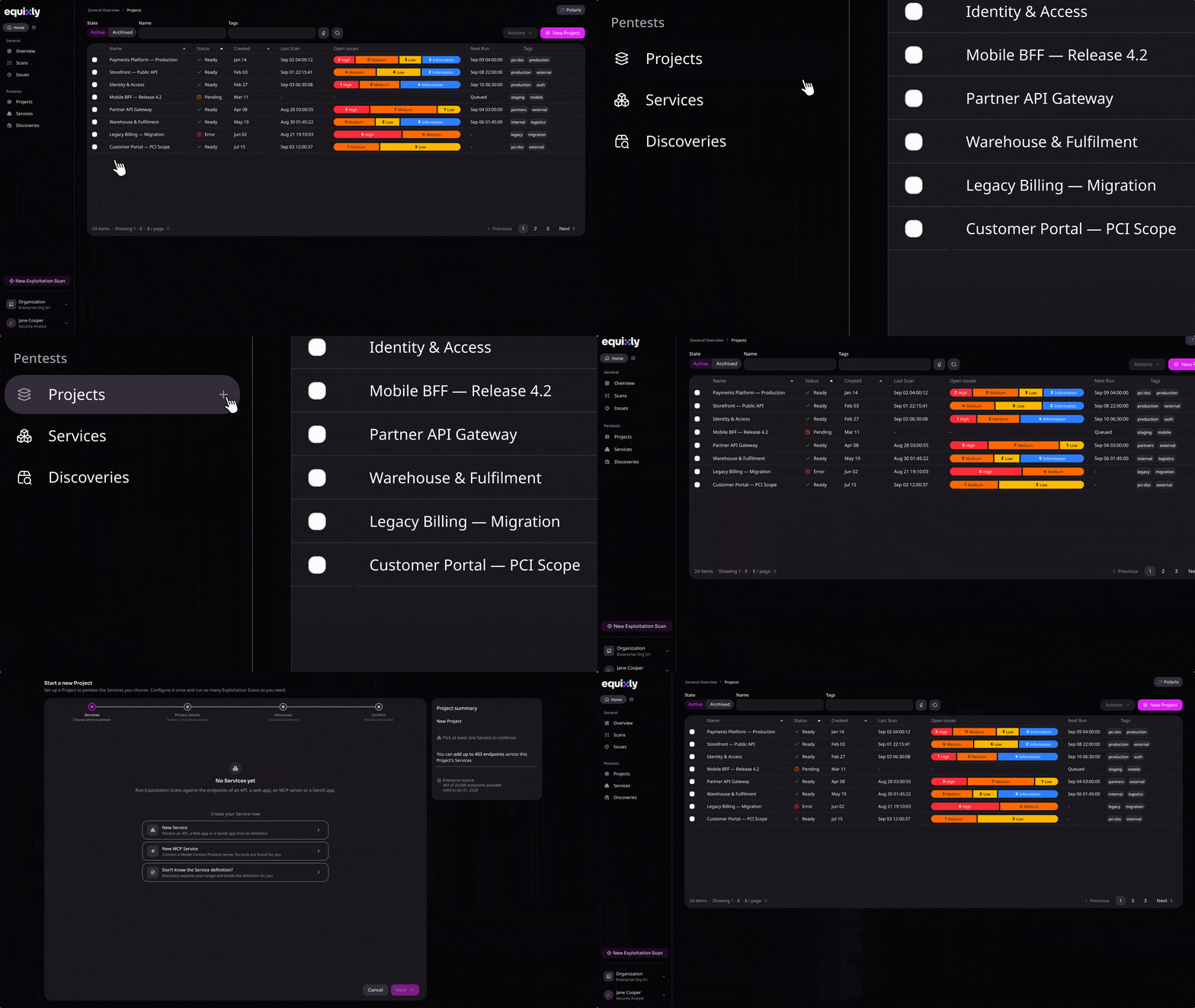
The sidebar, redesigned in our early October release, now comes with shortcuts that let you start common tasks without first navigating to the relevant page. From the sidebar, you can now:
- Create a Service, including MCP Services.
- Create a Project.
- Launch a Discovery.
- Launch an Exploitation Scan.
The Service and Discovery shortcuts open a dialog over the current page, so you don’t lose your place. The Project shortcut opens the project creation wizard described above. The Exploitation Scan shortcut can run the scan in an existing Project, where it starts automatically, or in a new Project, where you configure the scan and then run it.
That’s October’s second product update
This release makes authentication in Projects simpler and gives you clearer guidance wherever you start in the platform.
Plain-language logins, broader SPA coverage, and clearer next steps throughout the platform.