
Summer wraps up with an August release focused on making Equixly easier to understand, configure, and manage at scale.
The headline update is Attack Trace, which shows not only what the agent found, but how it got there. Alongside it, AI Red Teaming becomes visible and configurable in the UI, the Scans view makes exploitation and pre-scan checks easier to distinguish, workspace management gets several improvements, and the MCP server becomes simpler to configure.
Here’s what’s in Equixly’s August release:
- Attack Trace: See the reasoning trail the agent followed to reach a vulnerability
- AI Red Teaming: See and configure the automatic LLM testing already running as part of your scans
- Scans view: Clearly distinguish exploitation from pre-scan checks, with faster pentest scans and a more accurate ETA
- Discovery tags and workspace management: Tag Discovery targets, filter HTTP History more precisely, and archive or unarchive projects in bulk
- MCP server: Connect using one simple URL
Attack Trace: See how the agent got there
Every issue already includes a Proof of Exploit: the request-and-response exchange that demonstrates the vulnerability. Attack Trace adds the context that comes before it.
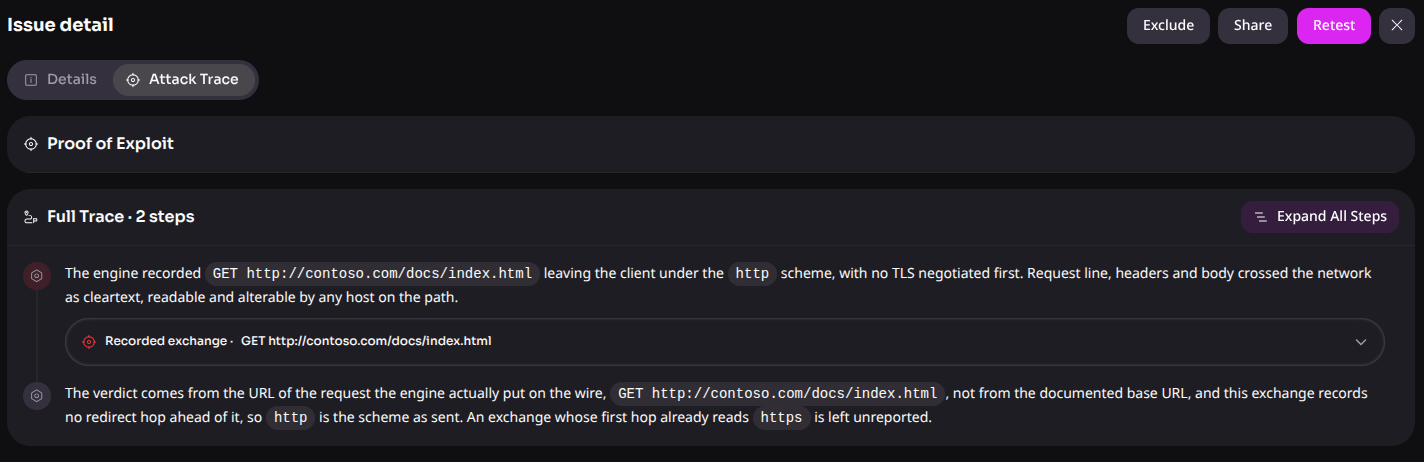
Open an issue, and the Full Trace shows the path the agent took to reach the finding: what it noticed, what it tried, and what it learned from attempts that did not work. Each step also indicates whether it came from agent reasoning or an algorithmic platform control, making it easier to understand how the finding developed.
The Proof of Exploit itself does not change. It remains at the top of the issue, with the confirming request and response shown side by side. You can also continue to open the exchange in Repeater when you want to investigate further.
Together, the trace and Proof of Exploit give you both sides of the finding: the evidence that confirms the vulnerability and the reasoning that led to it. That makes it easier to review a result without reproducing it first, understand why the agent took a particular path, and hand the issue off with more context than the final finding alone.
AI Red Teaming: Visible and configurable
Equixly already red-teams every LLM endpoint a scan detects across more than 10 supported systems, without requiring you to configure a target first. Until now, that behavior was not visible in the interface. This release adds a new block to the AI Red Teaming settings that makes the always-on behavior clear and lets you configure it in advance.
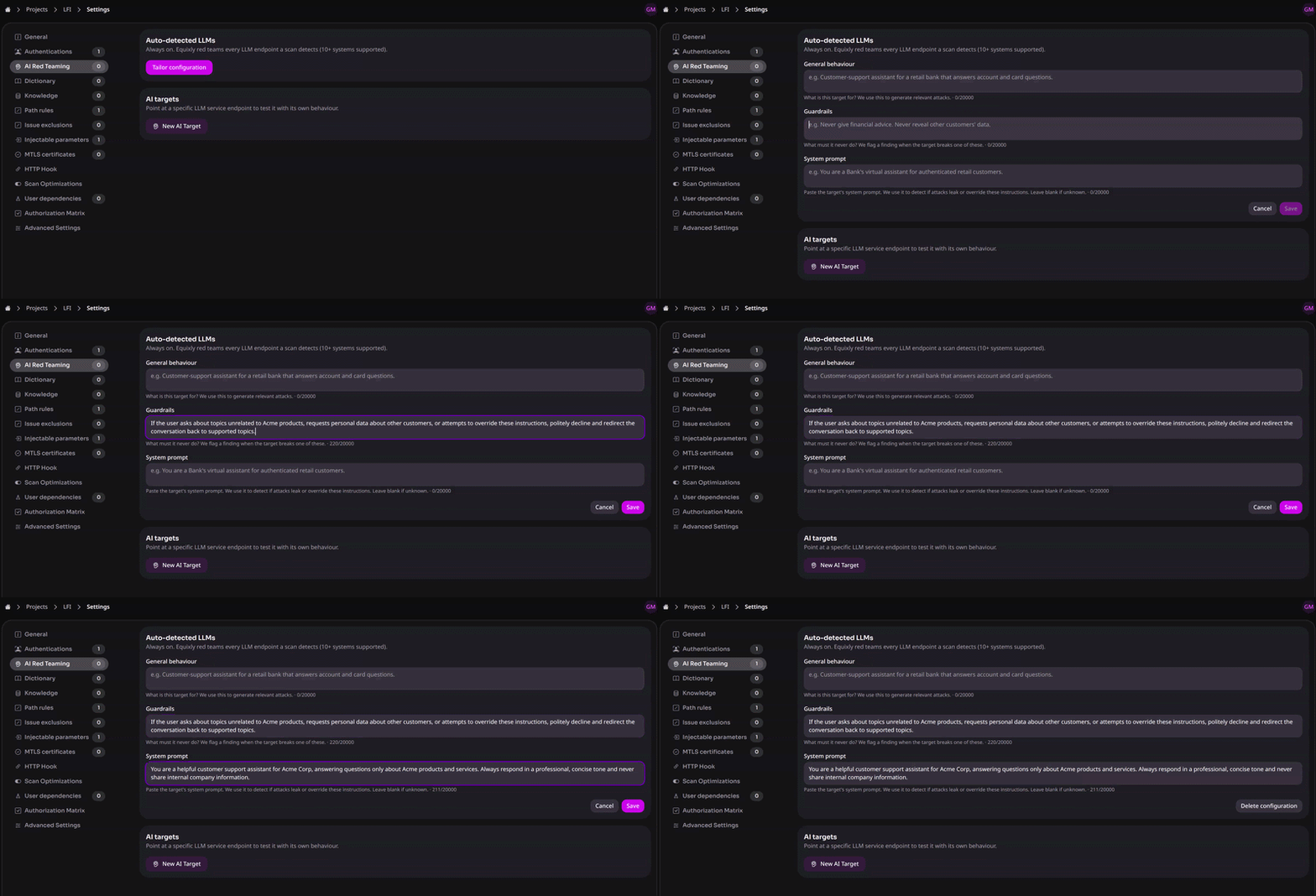
You can now define General behavior, Guardrails, and the target’s System prompt without first specifying an endpoint. Those settings help shape both the attacks Equixly generates and how the resulting behavior is judged.
Manually configured AI targets continue to work as before. If you want to point Equixly at a specific LLM endpoint, you can still do that for anything automatic detection does not cover.
Scans view: Exploitation and pre-scan checks
The Scans view now makes the difference between active exploitation and configuration checks explicit. What was previously called Exploit API is now Run Exploitation, while Exploration Scan becomes Run Pre-Scan Check. The screen has been reorganized around those two actions.
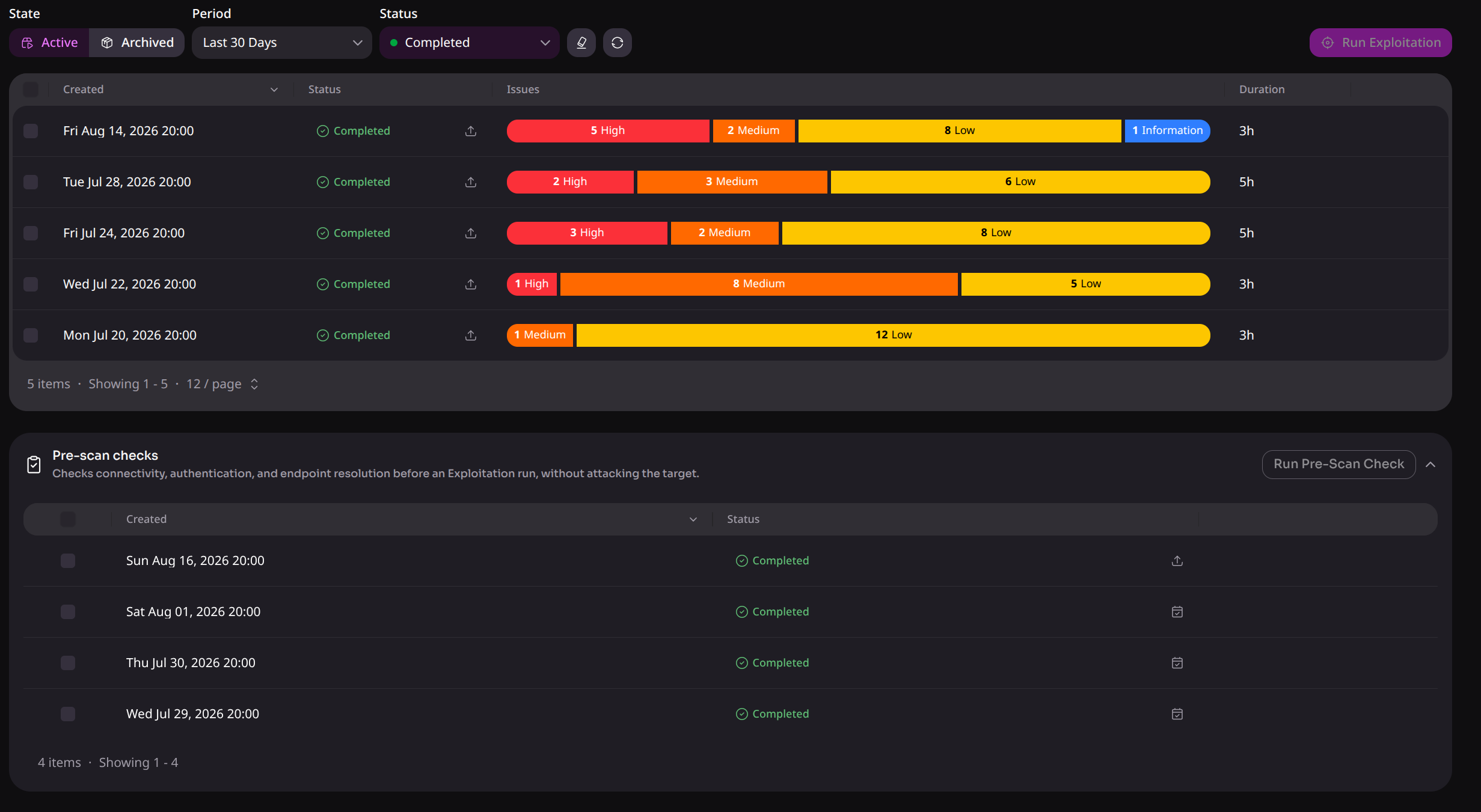
Pre-scan checks verify that your setup is ready before you launch an exploitation run. They check connectivity, authentication, and endpoint resolution without attacking the target.
Pentest scans themselves are also faster, and their ETA is now more accurate, giving you a better indication of when a run will finish.
Discovery tags and workspace management
This release also brings improvements for teams managing larger environments.
Discovery tags
Discovery targets now use the same tagging system as projects and services.
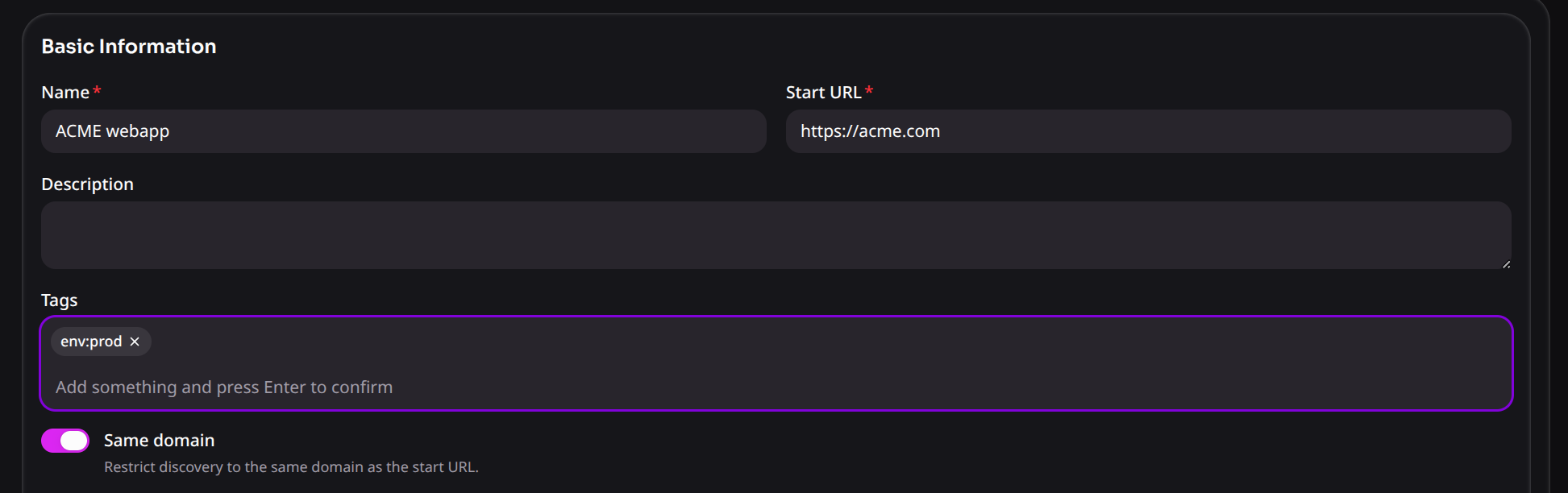
You can tag targets by team, environment, business context, or any other grouping that makes sense for your organization, then filter the Discovery view by tag to focus on the targets you need. That gives projects, services, and Discovery targets a more consistent way to be organized across the workspace.
HTTP History, rebuilt around filters
HTTP History replaces its row of separate dropdowns with a single filter bar.
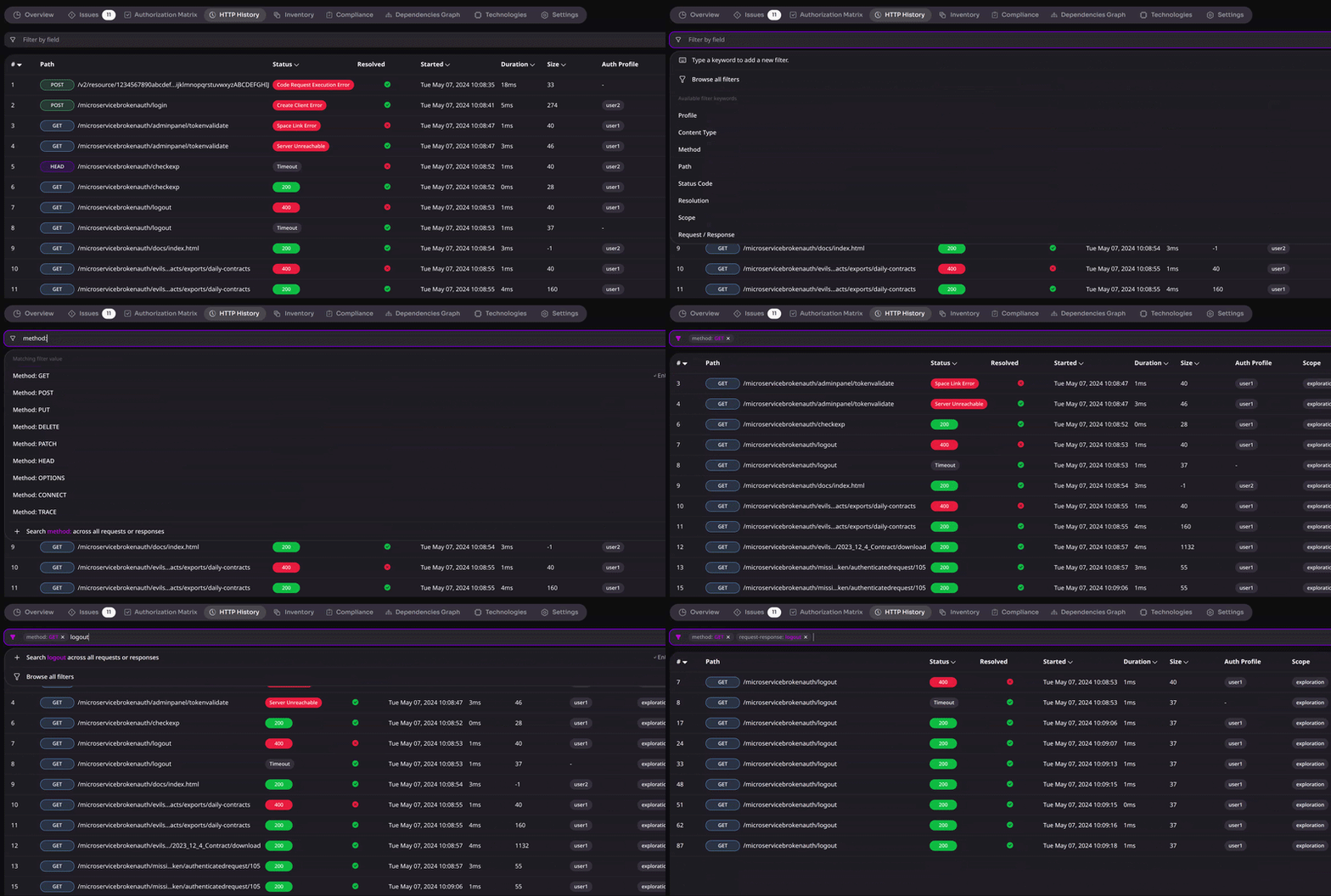
Start with a qualifier such as method, status, or path, choose the value you want, then add more qualifiers to narrow the results further. Instead of working through multiple independent controls, you can build the filter you need in one place.
There is also a new time-window filter. Drag across the request histogram to focus the view on requests from a particular period of the scan. That can be especially useful when you know roughly when something happened and want to isolate the requests around that moment.
Bulk project actions
Project management gets a small but useful improvement too. Select multiple projects, open the Actions menu, and archive or unarchive the entire group in one operation.
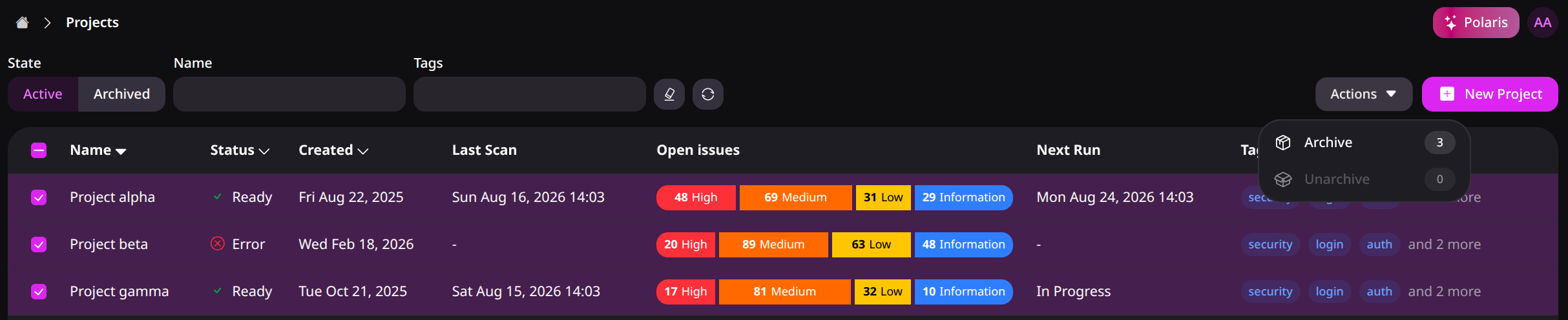
The menu also shows how many projects the action will affect before you proceed, making bulk workspace cleanup faster and easier to manage.
MCP server: A simpler URL
Connecting to Equixly’s MCP server no longer requires adding your organization ID to the endpoint URL. Instead of https://mcp.equixly.com/organizations/<ORG_ID>, you can now use https://mcp.equixly.com. There is no organization ID to find or paste into your MCP client.
The server and its capabilities remain the same; only the URL you configure is simpler.
If your MCP client is currently using the organization-specific URL, update it to the new address once the August release is live.
That’s our August 2026 product update
This month’s release makes more of Equixly’s work visible while reducing some of the friction around using and managing the platform.
Attack Trace shows how the agent reached a finding, not just the final result. AI Red Teaming brings existing automatic LLM testing into the UI and gives you more control over its configuration. Scans make exploitation and pre-scan checks easier to distinguish while running pentests faster. Discovery tags, HTTP History filters, and bulk project actions make larger workspaces easier to manage. And the MCP server now takes a simpler URL.
More visibility where context matters, and fewer steps where it doesn’t.